

Smarter Tools. Smoother Operations. Happier Teams.
Running a restaurant means juggling hundreds of moving parts, including staffing, menu changes, payments, kitchen flow, and more. Every second matters. This quarter, Qu focused on making your day a little easier with features that simplify work, boost accuracy, and create better guest experiences.
Let’s take a look at what’s new.
POS
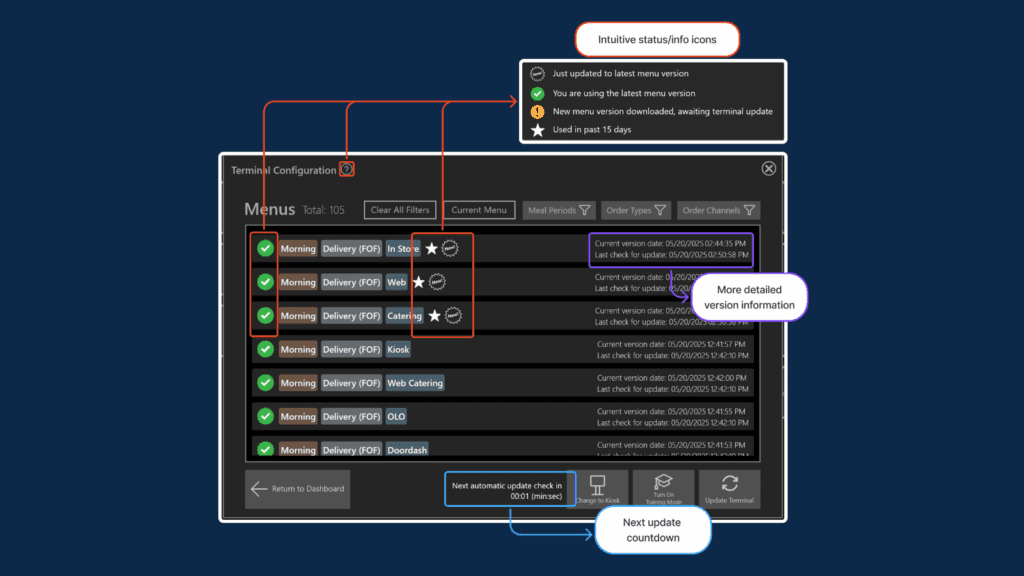
1. Instant Visibility into Menu Updates: See Your Menu’s Status at a Glance
Have you ever wondered if a menu change actually went live across all your locations? Now you’ll know right away. A new set of icons shows each menu’s status, version, and update schedule—all available through the POS.
The Value-Driven Advantage
Faster clarity and fewer menu mistakes because you can instantly see what’s live, what’s pending, and what needs attention—no digging required.
2. EMV Connectivity Validation: Better Network Visibility for Payment Devices
When payment terminals go offline, it can cause long lines and frustrated guests. With this update, you can now check the live status of your payment devices—Aurus, FreedomPay, TriPOS, and Verifone—directly from the Network Diagnostic Tool.
The Value-Driven Advantage
Keep lines moving and avoid payment guesswork by seeing exactly which terminal is down before it slows your team and your guests down.
3. Unified Reports Access: One-Click Access to Reports
We’ve added a single “Reports” button on the POS that consolidates End of Day, End of Shift, and Tills reports in one spot. You can also navigate back to the main menu with one click.
The Value-Driven Advantage
Wrap up shifts faster with less frustration since the reports needed are all in one spot, just one tap away.
Kiosk
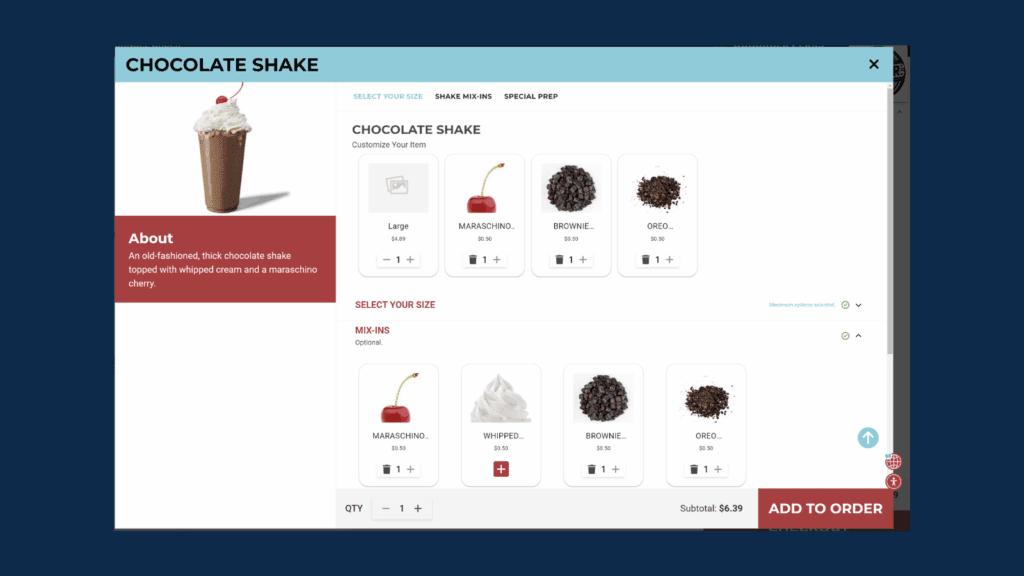
4. Image Grid Layout for Modifiers: A Visually Appealing View for Guests
A visual, image-first grid makes browsing modifiers more fun and intuitive (supports one layer deep).
The Value-Driven Advantage
Guests decide quicker and add more to their order when they can simply tap pictures instead of reading through long lists.
5. Multi-Language Support: A More Inclusive Kiosk Experience
Guests can now switch kiosk languages instantly, with support for over 50 languages.
The Value-Driven Advantage
More confidence and fewer errors when guests can order in the language that feels most natural to them.
6. Dietary Filtering for Guests: Smarter Guest Choices with Dietary Preferences at Kiosk
Guests can filter menu items by Vegan, Vegetarian, or Gluten-Free options, depending on what the brand sets up.
The Value-Driven Advantage
Make faster, safer choices without relying on staff—keeping the line moving and everyone at ease.
7. Spotlight Tags: Eye-Catching Promotions at the Kiosk
Add subtle “New,” “LTO,” or “Guest Favorite” badges on item cards to guide choices.
The Value-Driven Advantage
Promos get noticed and your sales bump naturally thanks to simple tags that guide guests without overwhelming the screen.
8. Barcode Scanning at Kiosk: Empower a Better Self-Service Experience
Guests can scan packaged items (UPC/EAN) and the kiosk adds the right product automatically. QR still works for loyalty.
The Value-Driven Advantage
Get smoother self-service and fewer bottlenecks because guests can scan packaged items themselves and get on their way.
Kitchen
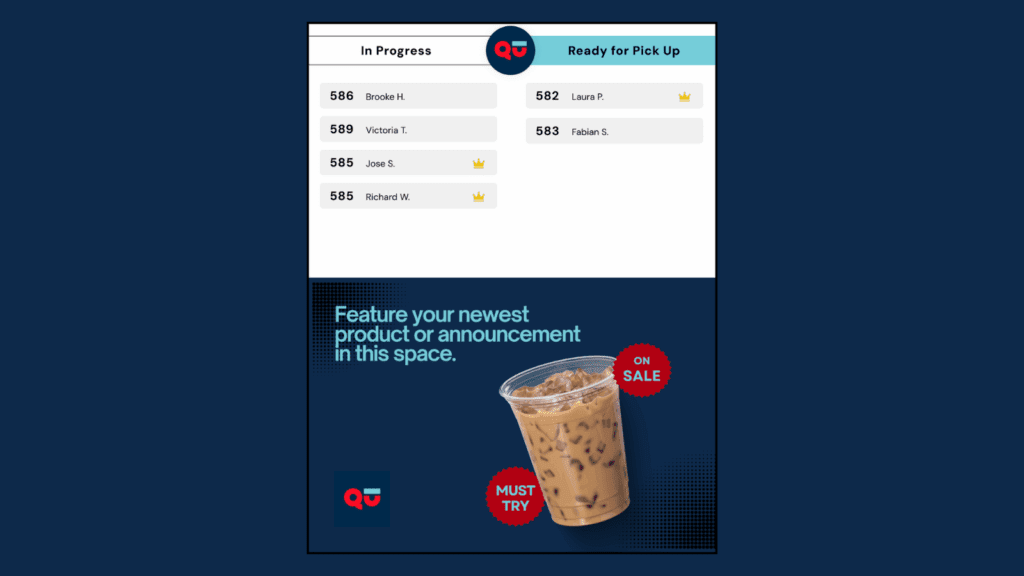
9. Qu Order Status: Connect Kitchen Prep to Guest Pickup
A new Order Status screen links the kitchen to the pickup area in real time, showing guests which orders are ready.
The Value-Driven Advantage
Calmer and more predictable pickup for everyone. Guests stop asking “Is my order ready yet?” because they can see real-time updates.
10. KDS Item Count View: Real-Time Kitchen Insights
Kitchen teams can now see, at a glance, how many of each item or ingredient needs to be prepped.
The Value-Driven Advantage
Stay fast, focused, and in sync with a clear view of exactly how many items need to hit the grill or fryer.
Notify & Enterprise Intelligence (EI)
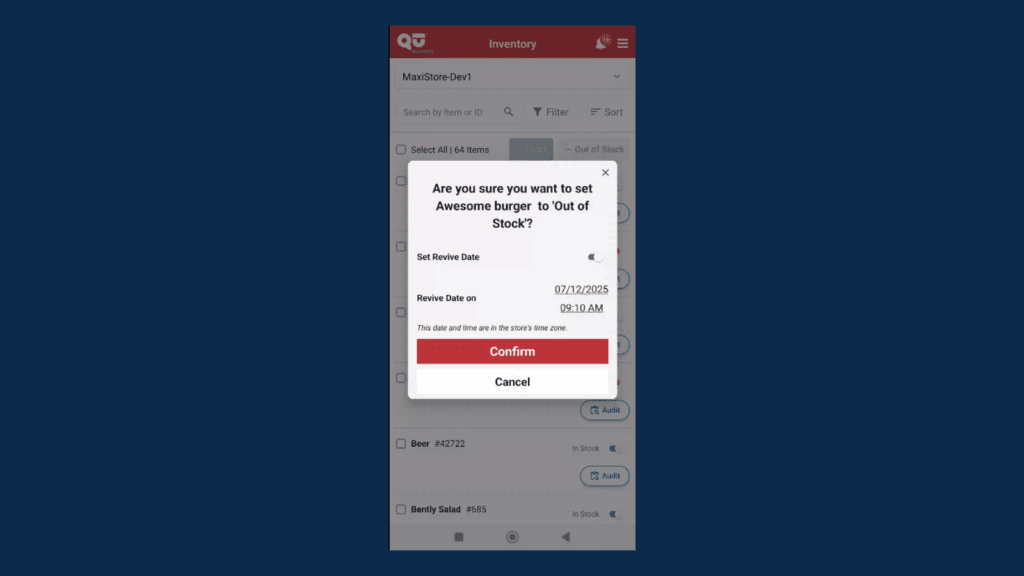
11. Notify Item Availability: Manage in and out of stock items anywhere
Mark items in/out of stock from your phone and set a “Revive Date” to auto-restock later.
The Value-Driven Advantage
Avoid disappointing guests and keep menus accurate by updating 86s the moment something runs out, right from your phone.
12. Computed Pricing Groups: Make Pricing Smarter, Not Harder
Instead of manually updating prices one by one, you can set rules so prices automatically adjust based on other values.
The Value-Driven Advantage
Save time and avoid pricing errors with automatic updates that keep everything consistent—no spreadsheets required.
13. Add Items to Multiple Groups: Save Time with Bulk Item Management
You can now add items to multiple groups, versions, and contexts at once.
The Value-Driven Advantage
Get hours back during menu rollouts because one update is all it takes to apply changes across all your groups and contexts.
14. $0 Price Detection and Alerts: Catch Price Errors Before They Go Live
The system now flags items with $0 or invalid prices automatically, so you can fix them before they reach guests.
The Value-Driven Advantage
Catch costly mistakes before guests ever see them thanks to automatic alerts for missing or invalid prices.
15. Export and Import Menu Item Display Attributes: Easier Updates to Item Display Details
You can now export display attributes (like Screen Title, Check Title, and Kitchen Title) to a CSV file, edit them in bulk, and re-import them.
The Value-Driven Advantage
Update menus way faster with way less clicking by editing display attributes in a single CSV and importing them back in one go.
The Big Picture
Each of these capabilities is about one thing: making restaurant technology work for you. Whether it’s saving time, preventing mistakes, or creating a smoother guest experience, these Q3 features are designed to improve your daily operations.
In short: less guesswork, more confidence.
And that’s what smarter hospitality looks like. Serve Smarter with Qu.
 Back to

